Most people trying to buy USDT on Bybit P2P don’t realize they can still lose money, even when everything looks fine.
One wrong click or picking the wrong seller can cost you money. The good news is, you can skip the hassle by checking a few key things first.
This guide will show you how to buy USDT on Bybit P2P, step by step. If it’s your first time doing P2P trading, you’ll learn the common beginner mistakes and how to avoid them.
Bybit P2P lets you buy crypto directly from other users, and the platform keeps the seller’s USDT locked until the trade is done. This is why Bybit is safer than other P2P platforms.
If you don’t have a Bybit account yet, create one here (takes about 2 minutes and you’ll need it for this guide)
Why Some Beginners Lose Money Buying USDT on Bybit P2P
Before you start, know what usually goes wrong.
Trading With Unverified or New Sellers
Some beginners don’t know they should only trade with verified P2P sellers. They end up buying from unverified or new accounts without realizing it. Later, I’ll show you a simple way to find reliable Bybit P2P sellers.
Moving Conversations Outside Bybit
If there’s a dispute, Bybit can only see chats on its platform. Scammers know this, so they try to move conversations to WhatsApp or Telegram. Keep all chats on Bybit so that problems can be handled efficiently.
If you only buy from verified Bybit P2P sellers and keep chats on the platform, you’ll avoid problems.
Step by Step: How to Buy USDT on Bybit P2P
Buying USDT on Bybit P2P is super easy and safe. Here’s how you do it.
1. Create or Log In to Your Bybit Account
First, log in to your Bybit account. If you don’t have an account yet, create one here. You won’t be able to follow the next steps without it. For help with verification, my complete Bybit KYC guide will get you approved fast.
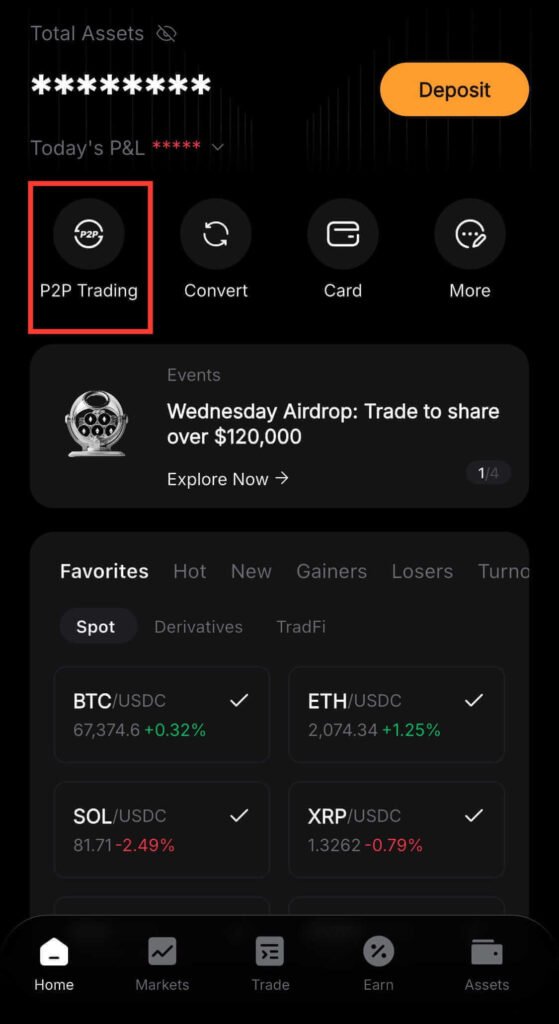
2. Go to the P2P Trading Section
Once you’re on the Bybit homepage, click P2P Trading.
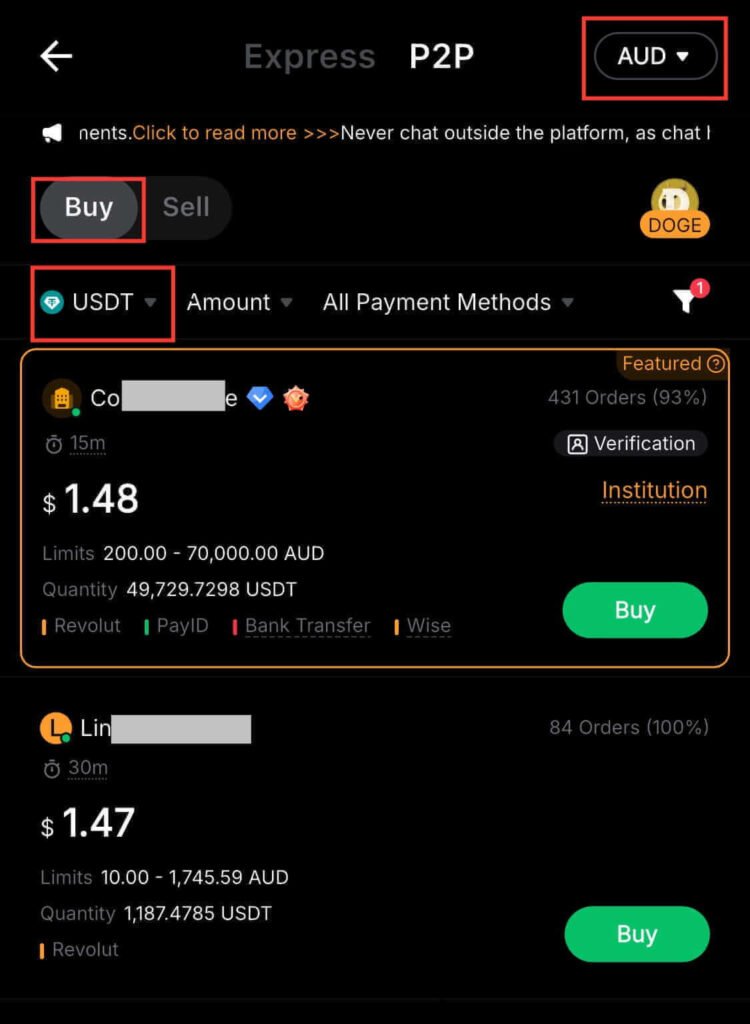
3. Select Buy USDT
At the top of the Bybit P2P page, click Buy and pick USDT from the coin list. You’ll see sellers offering USDT on Bybit P2P. Before you continue, check that your local currency is set correctly so your payment options work.
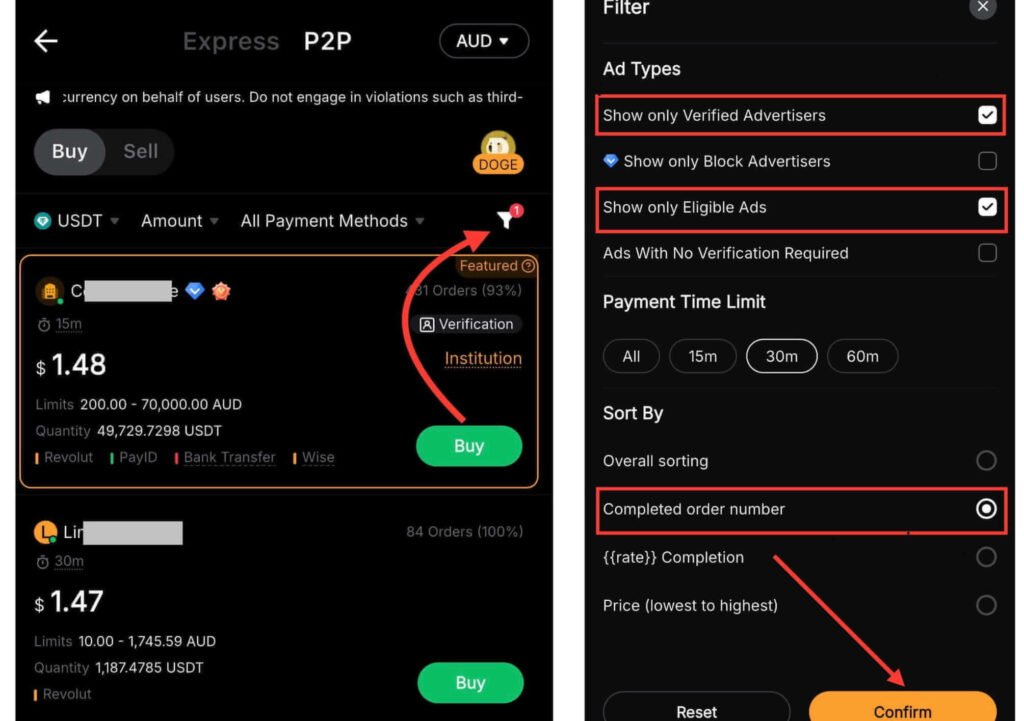
4. Filter Sellers (This Is Critical)
If you skip this, you’re more likely to have a bad experience. First, click the filter icon at the top of the page. After that, check Show Only Verified Advertisers and Show Only Eligible Ads. Next, pick your payment time limit and sort by Completed Order Number. Then hit Confirm to see the safest offers first.
5. Choose a Reliable Seller (Important)
Find a USDT seller with a good reputation and click Buy. Look at their verification badge, how many trades they’ve done, and their completion rate to see if they’re reliable. Highly rated Bybit P2P sellers usually complete trades quickly.
Note: Available payment methods depend on the country and currency you selected.
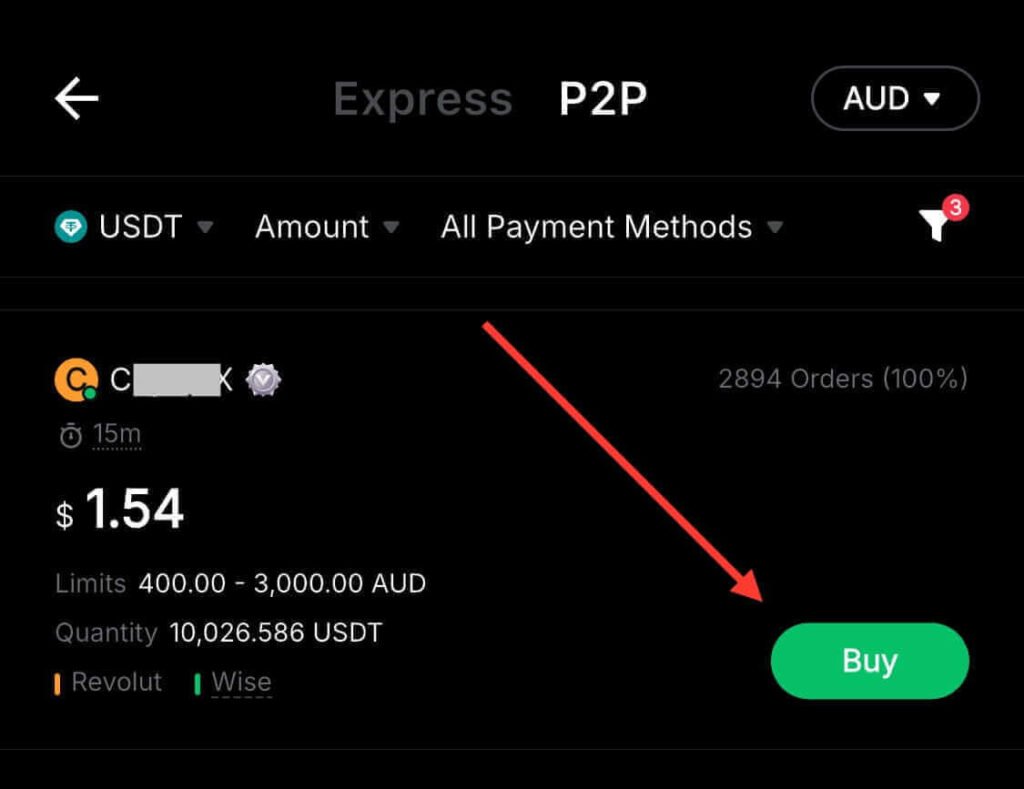
6. Enter USDT Amount to Buy
Take a moment to read the seller’s rules before you enter an amount. If that seller’s terms don’t work for you, try another one. Then, enter the USDT amount you want to buy and click Buy. This will secure the crypto in escrow and start your trade.
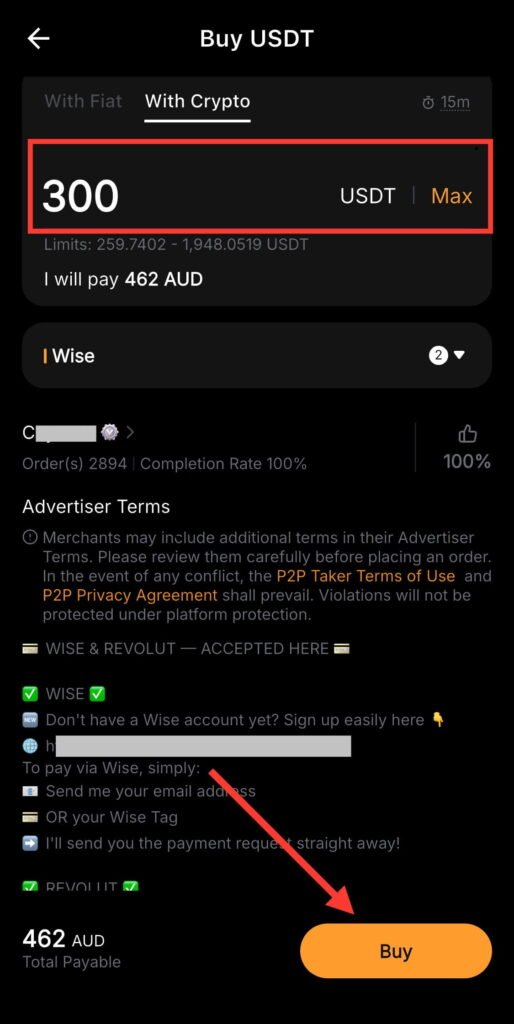
7. Make Payment to Seller
Send the exact amount using the details shown in your Bybit USDT order. Also, don’t mention crypto in the payment description because some banks can be strict.
8. Mark Payment as Completed
Once you’ve sent the money, return to Bybit and tap Payment Completed. This is important, don’t forget it.
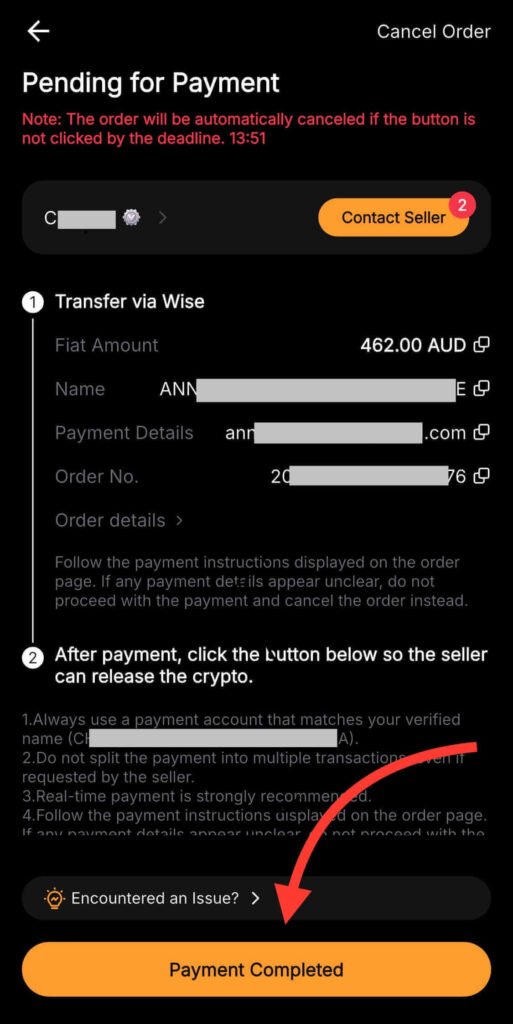
9. Wait for Seller to Release USDT
Once the seller confirms your payment, Bybit will release the USDT to your Funding Wallet. Depending on your country and payment method, it usually takes less than 15 minutes.
By now, your USDT should be in your wallet if you followed the steps. If you don’t have a Bybit account yet, click here to sign up and try your first P2P USDT trade. It only takes about 5 minutes.
How to Choose the Right USDT Seller on Bybit P2P
If you remember only 3 things when choosing a Bybit USDT seller, remember these:
Verified Badge
Your first move must be to pick a seller with a Verified or Merchant badge. This badge means Bybit has verified them. Verified sellers are safer, so avoid trading with anyone without a badge.
95%+ Completion Rate
A seller’s completion rate tells you how often their trades go well. A higher rate usually means trades go smoothly and have fewer issues. For safer P2P trading, pick sellers with 95% or higher. If two Bybit P2P sellers look about the same, choose the one with the higher completion rate.
500+ Trades
You can usually tell how experienced a seller is by how many trades they’ve done. Sellers with 500+ trades usually know what they’re doing, and if someone has over 1,000 trades, they’re usually very trustworthy. If they also have a high completion rate, your deal should go smoothly. Never trust sellers with just a few trades.
If you follow these tips, you’ll always find a reliable Bybit P2P seller.
Mistakes to Avoid When Buying USDT on Bybit P2P
Avoid these mistakes when buying USDT on Bybit P2P so you stay safe.
Choosing Unverified or Low-Rated Sellers
Most problems on Bybit P2P happen when people make this mistake. Low ratings often show that past buyers had trouble with that seller. Picking the wrong seller can lead to big problems. Always choose verified traders with good ratings.
Paying Outside the Bybit Platform
One of the most dangerous mistakes in P2P trading is trusting someone who tries to move you off Bybit. Then you’ll lose escrow and dispute protection. Don’t send money through other payment methods, and always keep chats on Bybit.
By now, you can see that most problems in P2P trading come from little mistakes and not the platform. Don’t worry if you’re feeling unsure because it happens to everyone at first. Some beginners like getting help with their first trade so they don’t mess up. I’ve shared how I do it here if you want a little help.
Sending Incorrect Amounts
This P2P mistake can cause serious problems. Sending the wrong amount or splitting payments can delay your USDT release or trigger a refund. Always double check the numbers and pay exactly what the order says.
Not Opening an Appeal When Needed
The Appeal button on Bybit helps protect you when trading P2P. If you’ve paid and the seller isn’t releasing the USDT or isn’t replying, open an appeal right away. Support can only help you after you open one.
Just so you know, as long as you keep your chats on Bybit and pay only through the order details, your money won’t be at risk.
Conclusion
If you’re going to buy USDT on Bybit P2P, you already know what to do. The difference between a successful P2P trade and a stressful one really comes down to who you trade with and how careful you are.
Now that you know what to check, don’t just learn. Open your Bybit account now and try it while this guide is fresh in your mind.
Additional Resources:
- Expert Tips to Avoid Scams When Trading on P2P Platforms
- How to Place Your First Limit Order Trade on Bybit
And guess what? We’re also on Instagram and X (Twitter). Join us there for even more fun and useful content!
DISCLAIMER:
The information provided here is for informational purposes only. Do not rely solely on it for making investment decisions. It is not financial, tax, legal, or accounting advice. Always do your own research or consult a financial advisor before investing in cryptocurrency.