If you want to convert USDT to Bitcoin on Bybit but aren’t sure where to start, you’re in the right place.
In this guide, I’ll show you step by step how to convert USDT to Bitcoin on both the Bybit app and website. I’ll also show how to convert USDT to other cryptocurrencies and what to check before confirming your swap.
Important Tips Before Converting Cryptocurrency on Bybit
Before you start converting on Bybit, here are a few quick tips to make sure everything goes as expected.
1. Make Sure You’re Converting to the Right Crypto
Make sure USDT is the coin you’re converting from and Bitcoin is the coin you’re converting to. If you’re converting to a different crypto, pick the right one instead. Beginners often mix these up, so double-check both coins before you hit confirm. That way, you won’t accidentally end up with the wrong coin.
2. Check the Conversion Rate Before Confirming
On Bybit, you’ll get a final quote before you confirm. It shows how much USDT you’re swapping and how much Bitcoin you’ll receive. Take a moment to check it before you press confirm. This is your last chance to review it, and the rate might be a little different from the market price.
3. Avoid Delaying After Receiving a Conversion Quote
On Bybit, conversion quotes don’t last long because crypto prices move so fast. If you wait too long, the price changes and so does the quote. So it’s best to check and confirm it quickly, or you could end up getting a different amount than you expected.
Taking a few seconds to review these points can help you finish your conversion smoothly on Bybit.
How to Convert USDT to Bitcoin or Other Crypto on Bybit Mobile App
The Bybit app makes it easy to convert crypto, even if you’re a beginner. Here’s how to swap USDT for Bitcoin or any other crypto step by step.
Step 1: Log in to Bybit
Open the Bybit app and sign in. Make sure you’re using the account that has the USDT you want to convert.
💡New to Bybit?
Open a free Bybit account here before following the steps below. Once your account is ready, you can buy, sell, convert, and store crypto from the same dashboard.
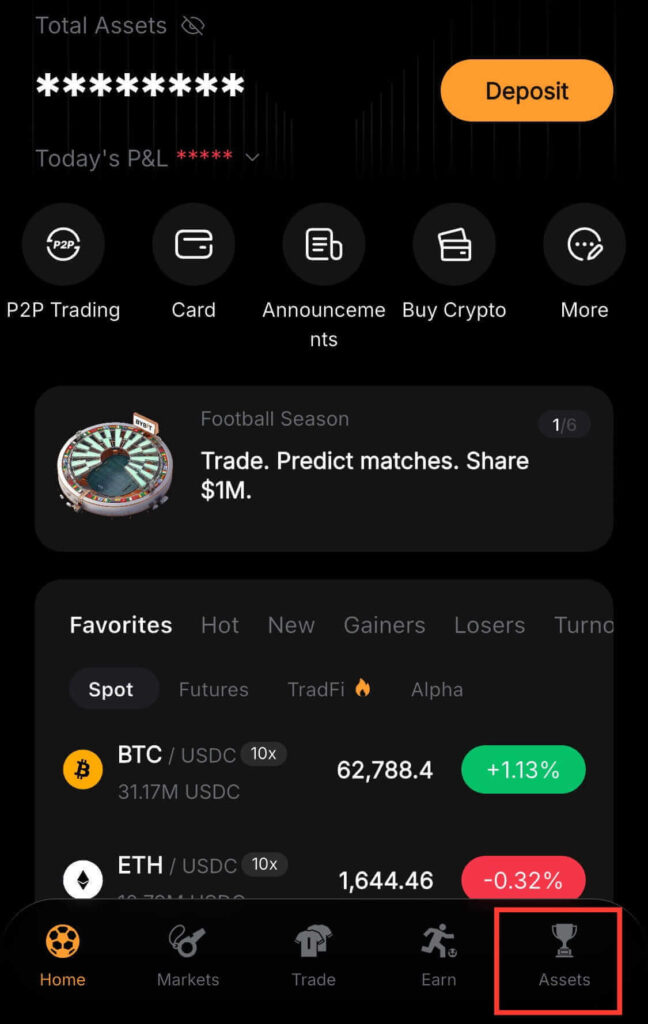
Step 2: Tap Assets
Tap Assets at the bottom of the app to open your wallet. Check that your USDT balance is visible before continuing.
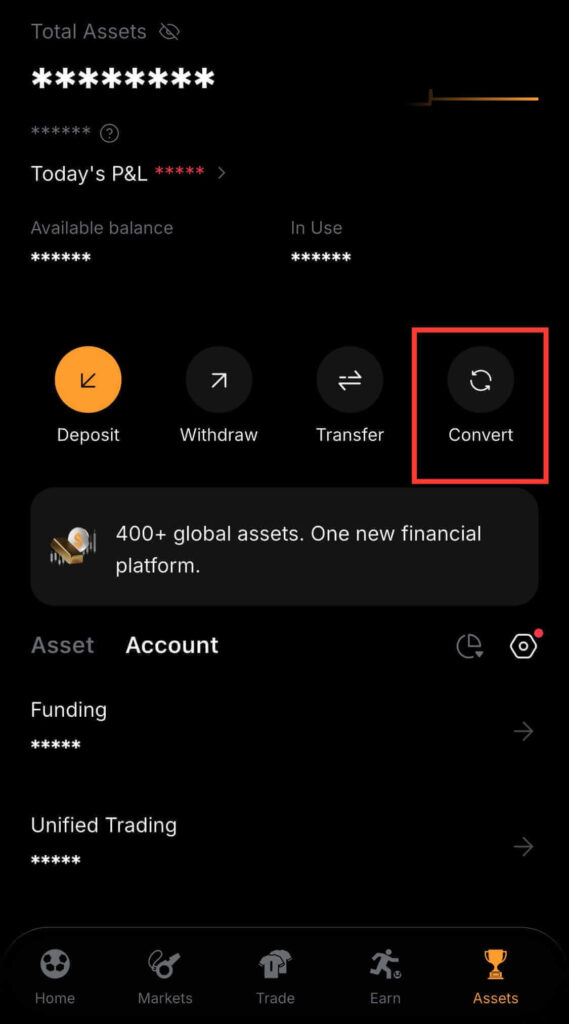
Step 3: Select Convert
Inside Assets, tap Convert. This is Bybit’s simplest crypto conversion tool. It lets you swap one cryptocurrency for another without stress.
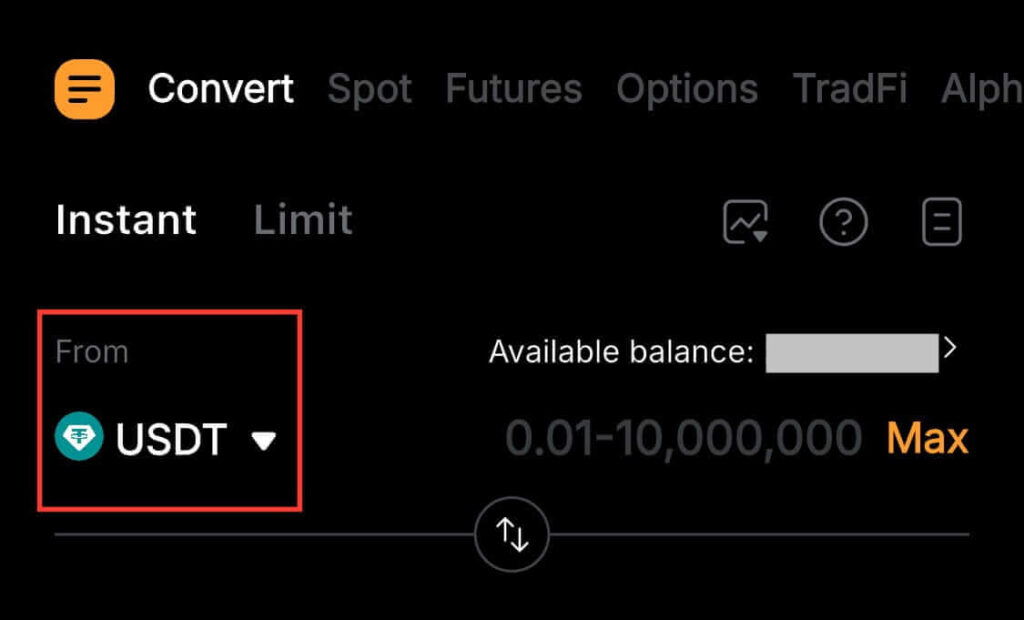
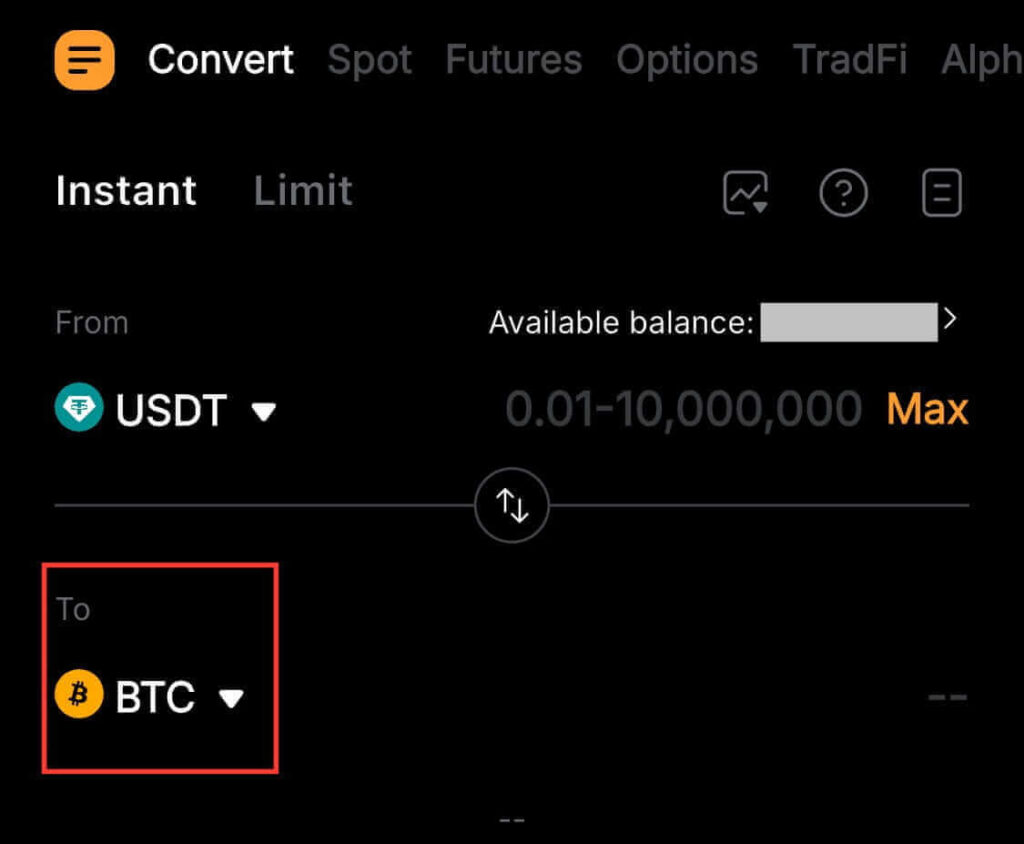
Step 4: Select USDT
In the From field, choose USDT. Then check your balance and make sure you’re converting the right crypto.
Step 5: Choose BTC
In the To field, choose BTC, which is Bitcoin. You can also choose a different coin if you don’t want Bitcoin.
Step 6: Enter Amount to Convert
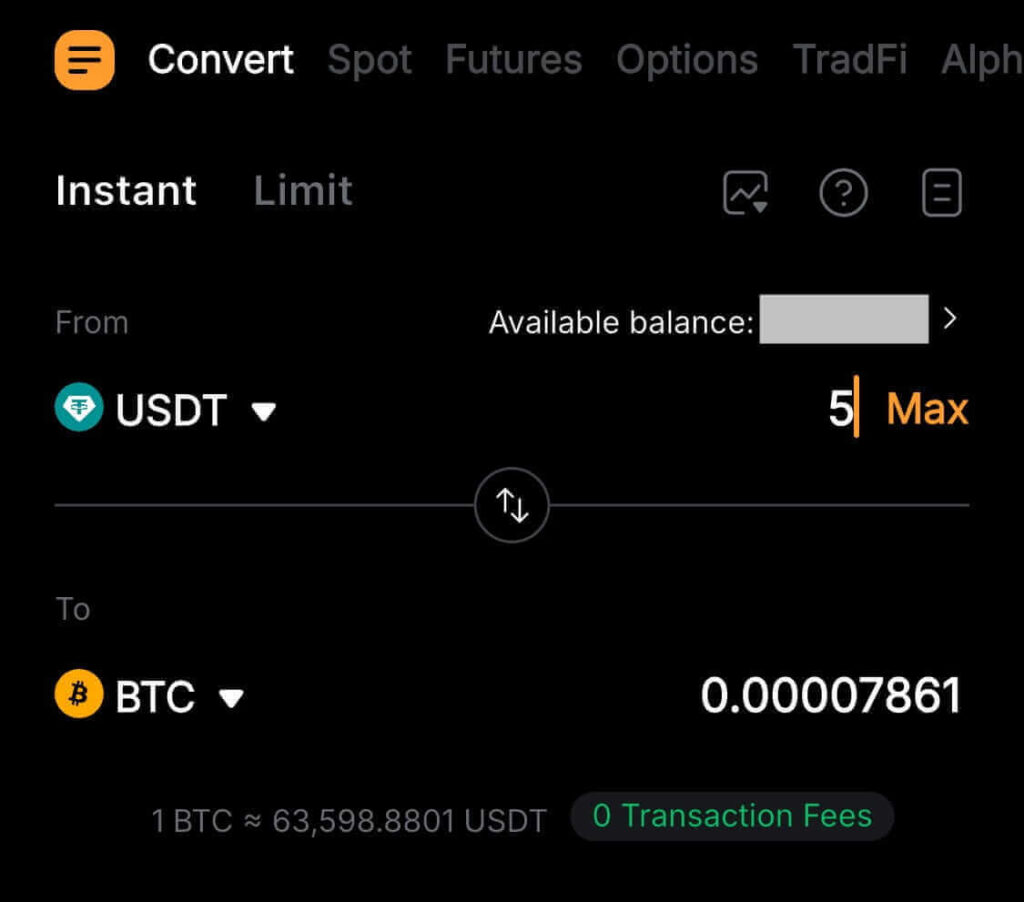
Enter the USDT amount you want to convert, or tap Max. Bybit will show you how much Bitcoin you’ll get. Check it before you continue.
Step 7: Tap Quote and Confirm
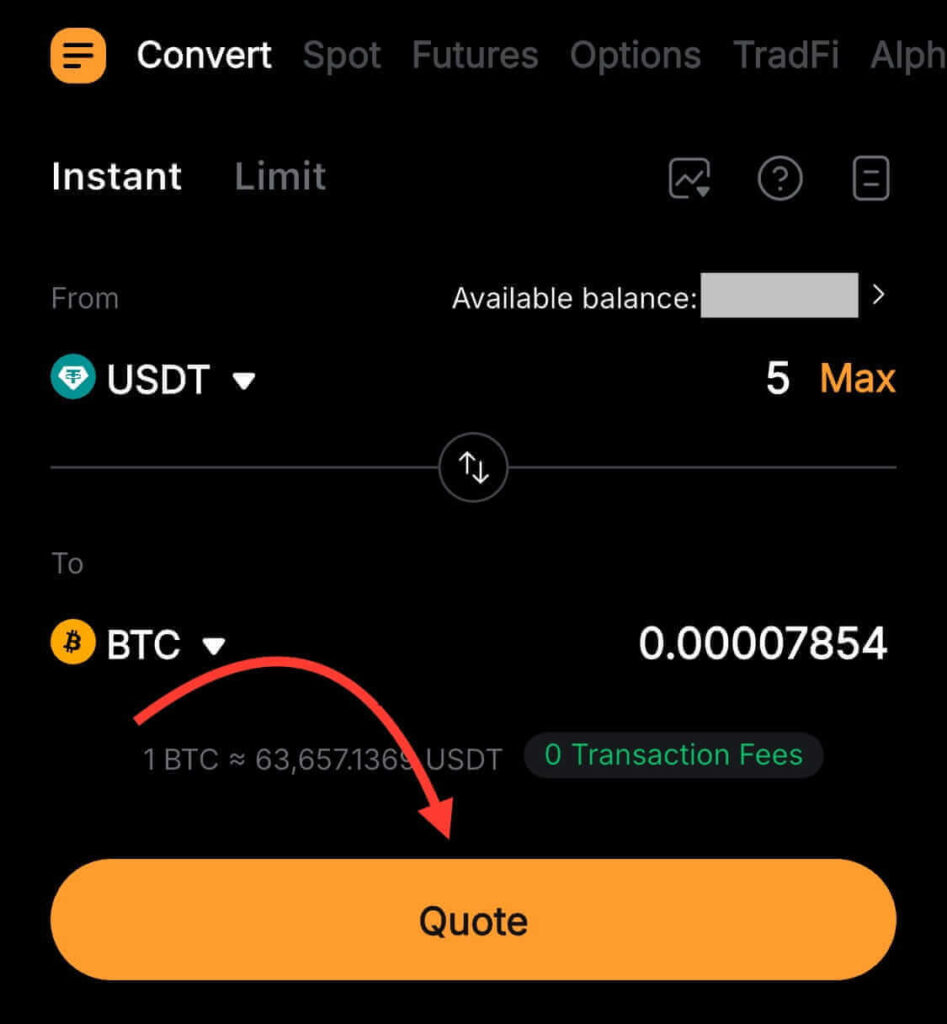
Tap Quote. Then check the coins, amounts, and the conversion rate. If everything looks right, tap Confirm before the quote refreshes.
Step 8: Verify Your BTC Balance
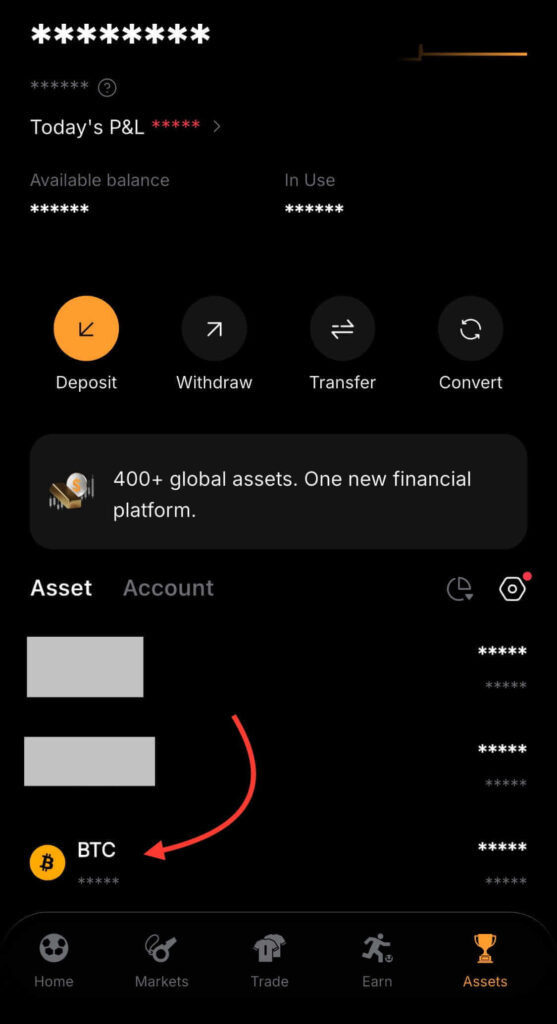
Go back to Assets and find BTC. You should see your updated Bitcoin balance there. You can also check your conversion history to confirm.
That’s all you need to convert USDT into Bitcoin on the Bybit app. It’s fast and simple, even if you’re a beginner.
How to Convert USDT to Bitcoin or Other Crypto on Bybit Website
If you’re using the Bybit website, you can also easily convert USDT to Bitcoin or other cryptocurrencies. Follow the steps below.
Step 1: Log in to Bybit Account
Go to the Bybit website, click Log In, then type in your details and sign in.
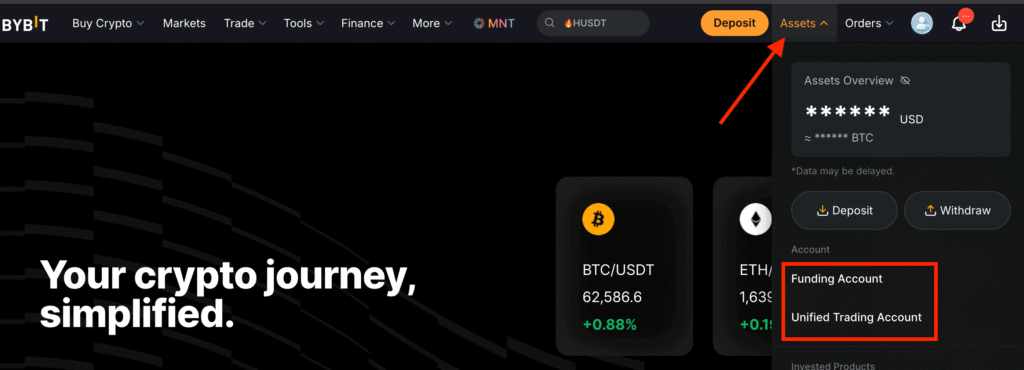
Step 2: Go to Funding Account or Unified Trading Account
Hover over Assets, then choose your Funding Account or Unified Trading Account, depending on where your USDT is.
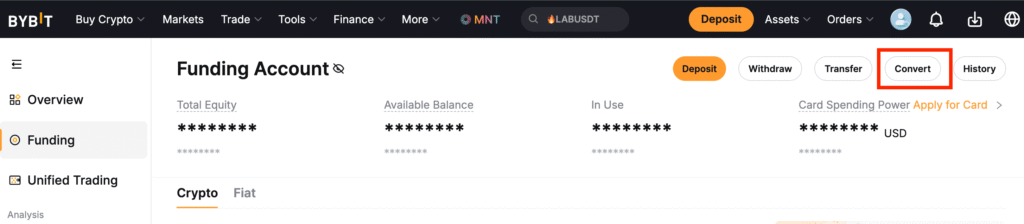
Step 3: Select Convert
Click Convert to open the crypto converter on Bybit. This lets you swap crypto easily.
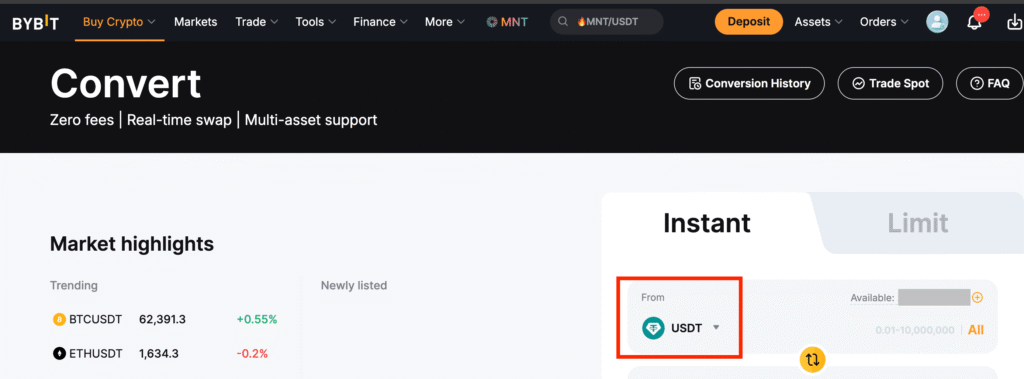
Step 4: Choose USDT
In the From field, select USDT. Then check your balance and make sure it’s the right coin.
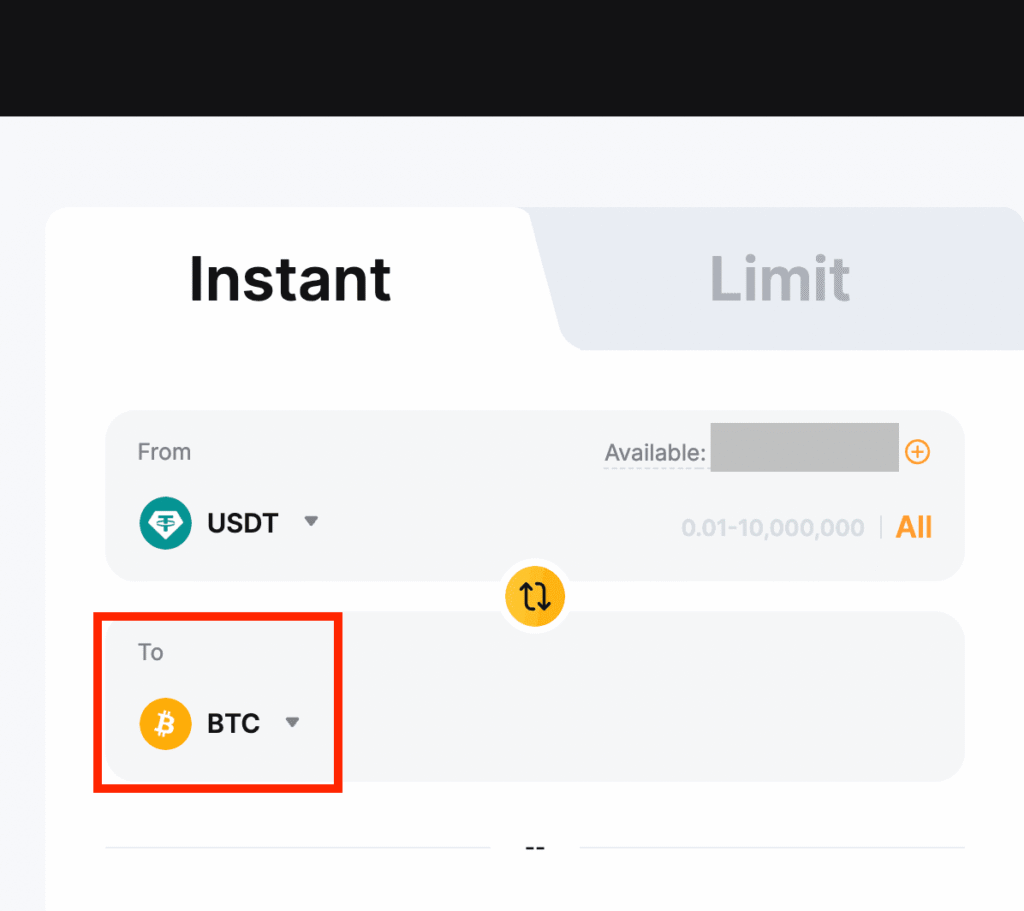
Step 5: Select BTC
In the To field, choose BTC (Bitcoin). Or pick any other crypto you want on Bybit.
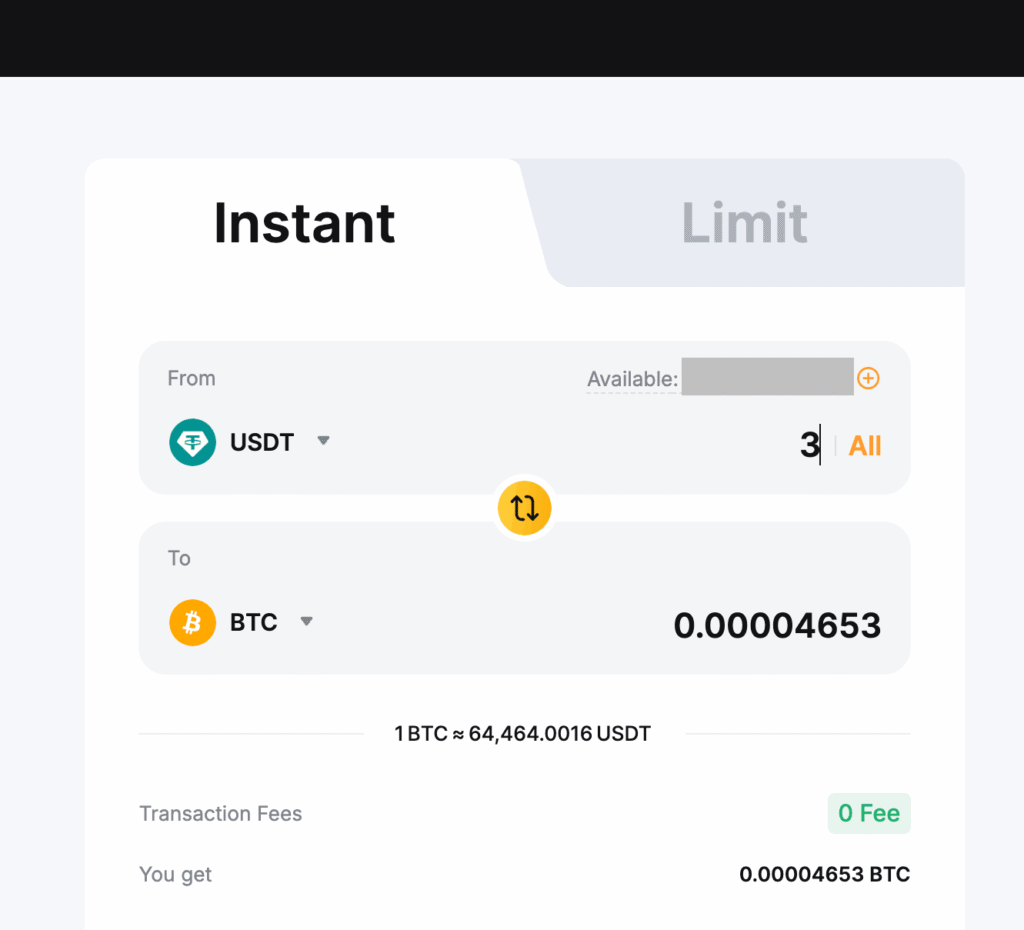
Step 6: Enter Amount to Convert
Enter the USDT amount you want to convert, or click All. Then check how much BTC you’ll get.
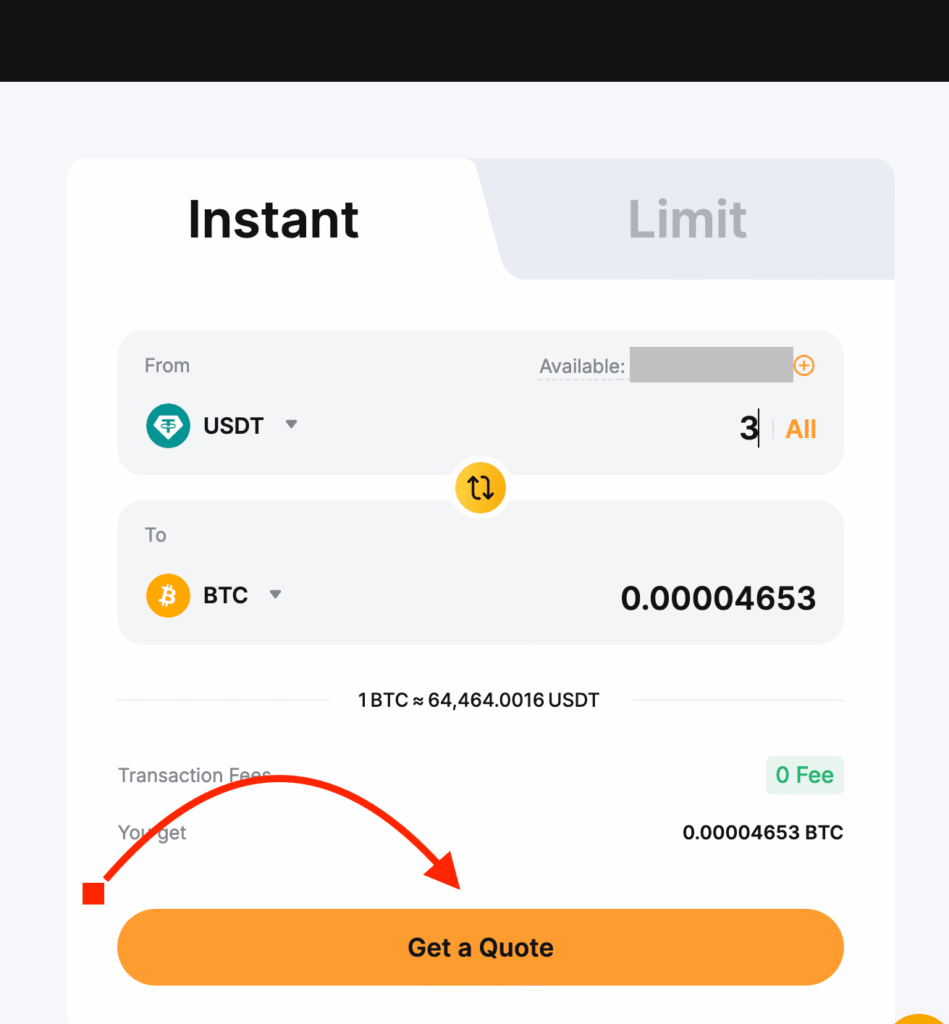
Step 7: Tap “Get a Quote” and Confirm
Click Get a Quote, review the conversion details, then click Confirm if everything looks correct. Note that quotes expire quickly.
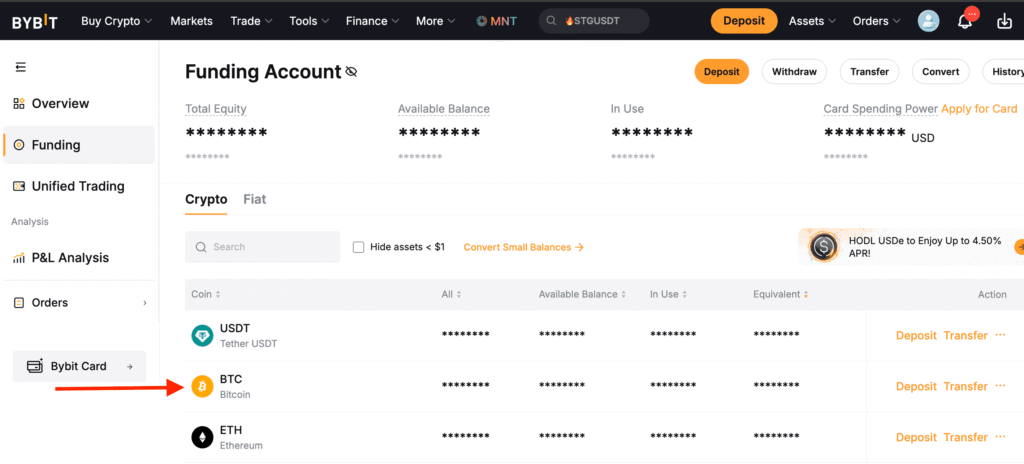
Step 8: Verify Your Bitcoin Balance
Go back to your account balances, find BTC, and check your balance or transaction history to confirm the conversion.
You’ve now completed your conversion from USDT to BTC using the Bybit website.
Why Some Traders Use Bybit Convert Instead of Spot Trading
Many traders use Bybit Convert because it makes converting crypto much easier. You don’t have to worry about charts, trading pairs, or order books. You just pick one coin, pick the other, and swap them in a few quick steps. It shows the rate upfront, and if it looks good, you just confirm the swap.
This makes Convert an easy way to swap crypto, especially for beginners who are worried about making mistakes or spending time watching charts and managing trades.
Spot trading, on the other hand, is often used by experienced traders because it gives them more control over prices, order execution, and access to advanced trading tools.
For many beginners, swapping crypto is often the easy part. The real challenge is knowing when to use tools like Convert, Spot Trading, and other exchange features without making costly mistakes.
If you want step-by-step help with using crypto exchanges, learning the basics of trading, and avoiding common beginner mistakes, check out my crypto coaching program.
Common Problems When Converting USDT to Bitcoin on Bybit
If something doesn’t look right during a crypto conversion, it’s usually because of a small setting or pricing detail, not a real problem.
1. USDT Balance Not Showing in Bybit Convert
If your USDT isn’t showing in Bybit Convert, it’s usually because the wrong account was selected, not missing funds. Your USDT could be in your Funding Account or the Unified Trading Account, and Bybit Convert could be pulling from the wrong one. Just check both accounts and select the one holding your balance.
2. Receiving Less Bitcoin Than Expected
Some people notice they get a little less Bitcoin than expected after converting. This usually happens because Bybit Convert uses a quoted rate, and it can be slightly different from the market price. Before you confirm, check the quote carefully since it shows the exact amount of BTC you’ll receive. Small differences are normal and just come from the rate at that moment, not a mistake.
Once you know why they happen, these problems are easy to avoid or fix next time you convert.
Conclusion
Converting USDT to Bitcoin on Bybit only takes a few seconds once you find the Convert feature. Whether you’re swapping into Bitcoin or another cryptocurrency, it’s really easy on both the app and the website.
If you don’t already have a Bybit account, create one here and make your first conversion.
If you’re still learning how exchanges, trading, and crypto investing work, here are some guides to start with:
- How to Buy USDT on Bybit P2P
- Step by Step: How to Complete Bybit Account Registration
- How to Store Your Crypto the Right Way
- How a Beginner Can Start Trading Crypto Safely
Or, if you’d prefer personal help, apply for my crypto coaching program.
FAQs
And guess what? We’re also on Instagram and Twitter(X). Join us there for even more fun and useful content!
DISCLAIMER:
The information provided here is intended for informational purposes only and should not be solely relied upon for making investment decisions. It does not constitute financial, tax, legal, or accounting advice. Additionally, I strongly recommend only investing money in cryptocurrency that you are comfortable losing.