Placing a limit order on Bybit is simple once you know where to click and what to enter.
In this guide, I’ll show you step by step how to place a limit order on Bybit Spot. In minutes, you’ll master entering the correct price and amount flawlessly.
Before we start, if you don’t already have a Bybit account, you’ll need one to follow this guide. You can create a free account here and claim any available signup bonuses.
What is a Limit Order?
A limit order lets you choose the exact price to buy or sell a cryptocurrency on Bybit. The trade only happens if the market reaches your set price.
For example, if Bitcoin is trading at $90,000, you can place a buy limit order at $88,500. The order will only be filled if the price falls to $88,500.
On exchanges like Bybit, using limit orders can lower your trading fees. They can also help you get a better entry price. But you have to use them properly.
How to Place a Buy Limit Order on Bybit Spot
This guide explains the right way to place a buy Limit Order on Bybit Spot.
Step 1: Log in to Bybit
First, log in to your Bybit account. If you don’t have one yet, create it here. Then follow my step by step guide to verify your Bybit account before continuing.
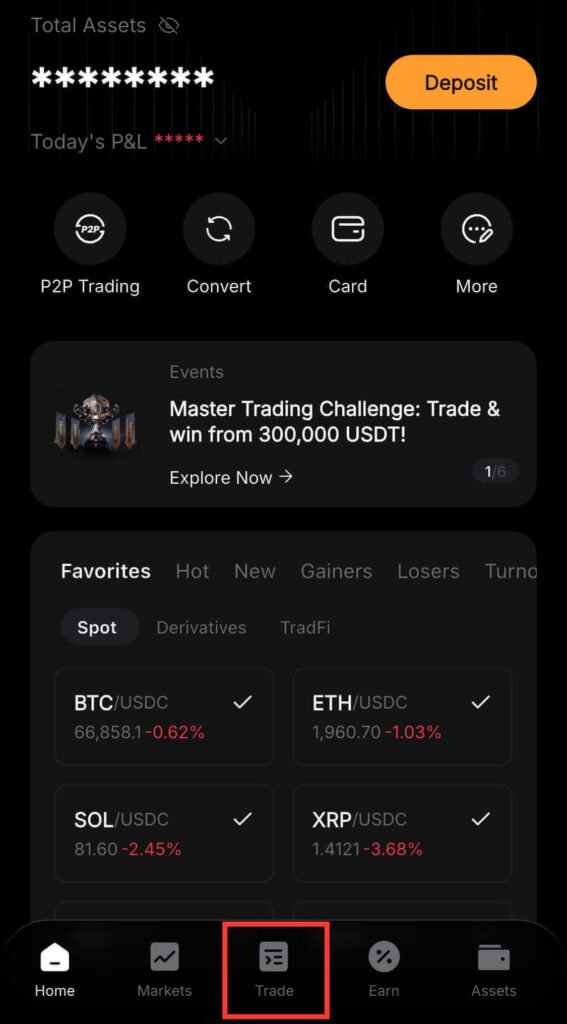
Step 2: Tap “Trade”
Next, on the Bybit home screen, tap Trade at the bottom. This will open the trading page, where you can place an order.
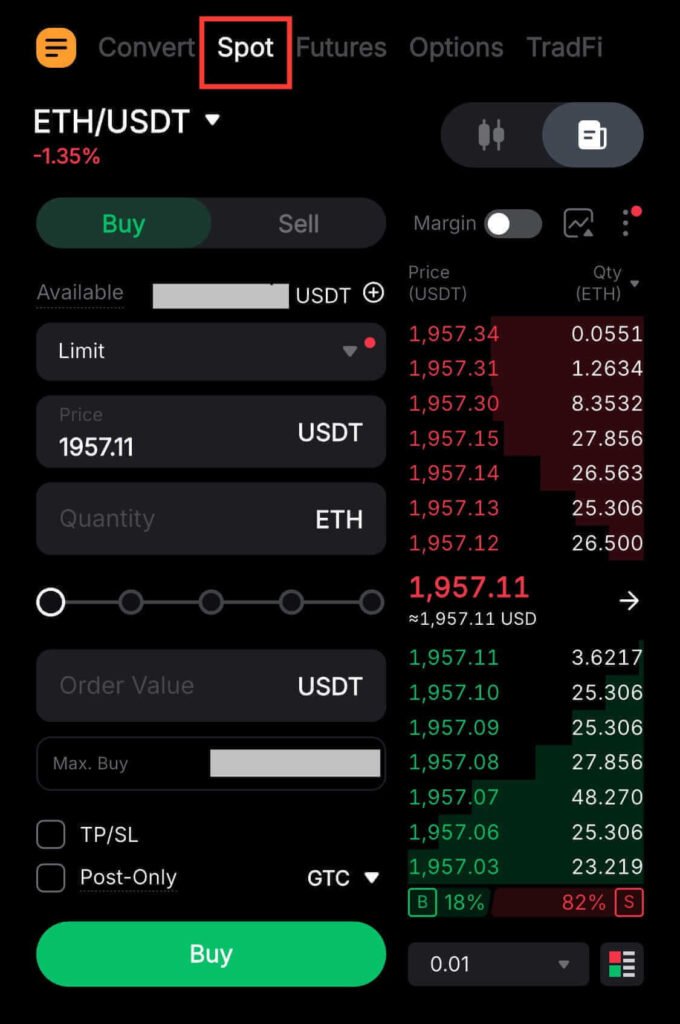
Step 3: Select “Spot”
At the top of the Bybit trading page, click on Spot.
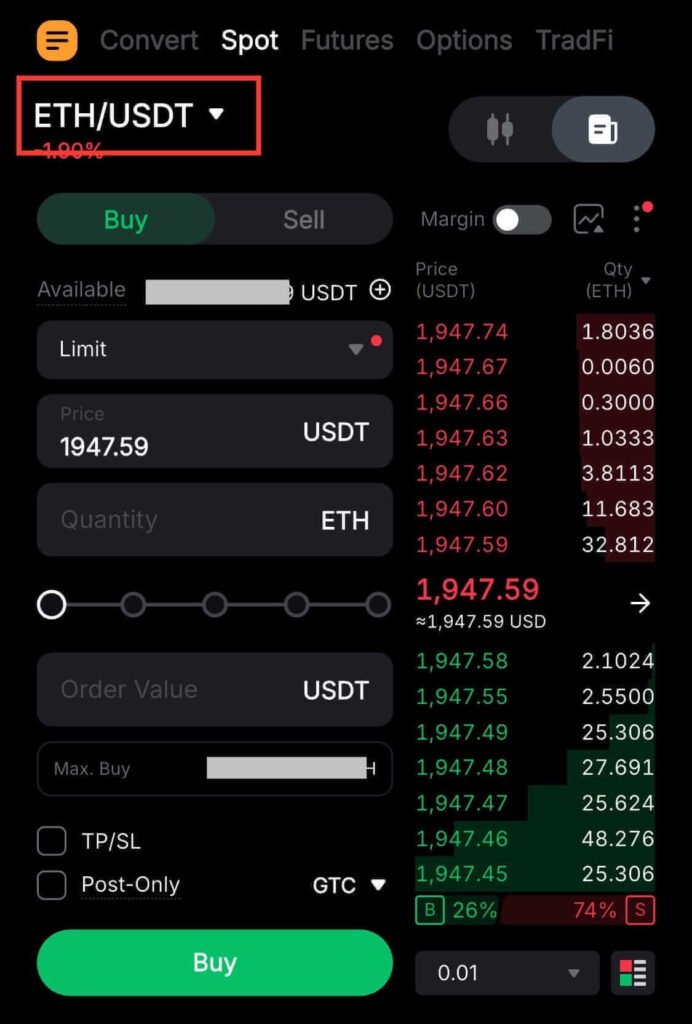
Step 4: Select a Trading Pair
Tap the trading pair (for example, ETH/USDT), then choose the pair you want to trade.
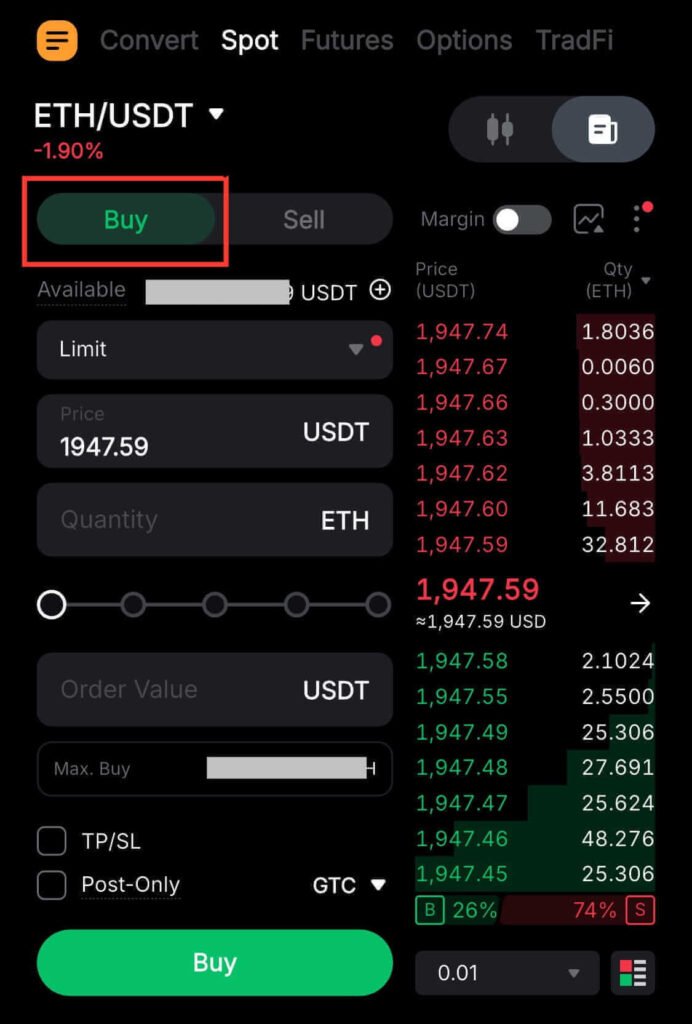
Step 5: Tap “Buy”
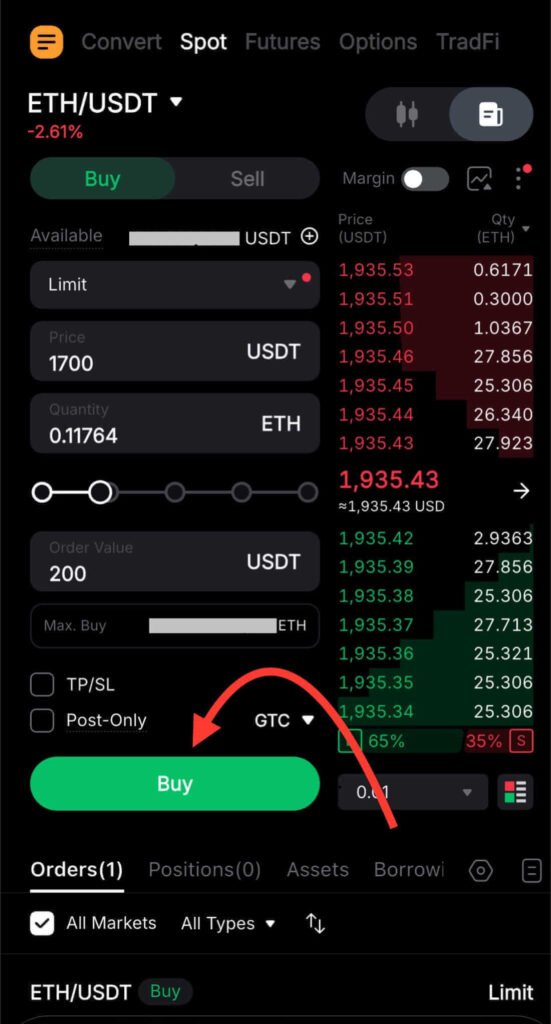
On the order panel, tap Buy to start creating a Bybit Buy order.
Step 6: Choose “Limit” Order
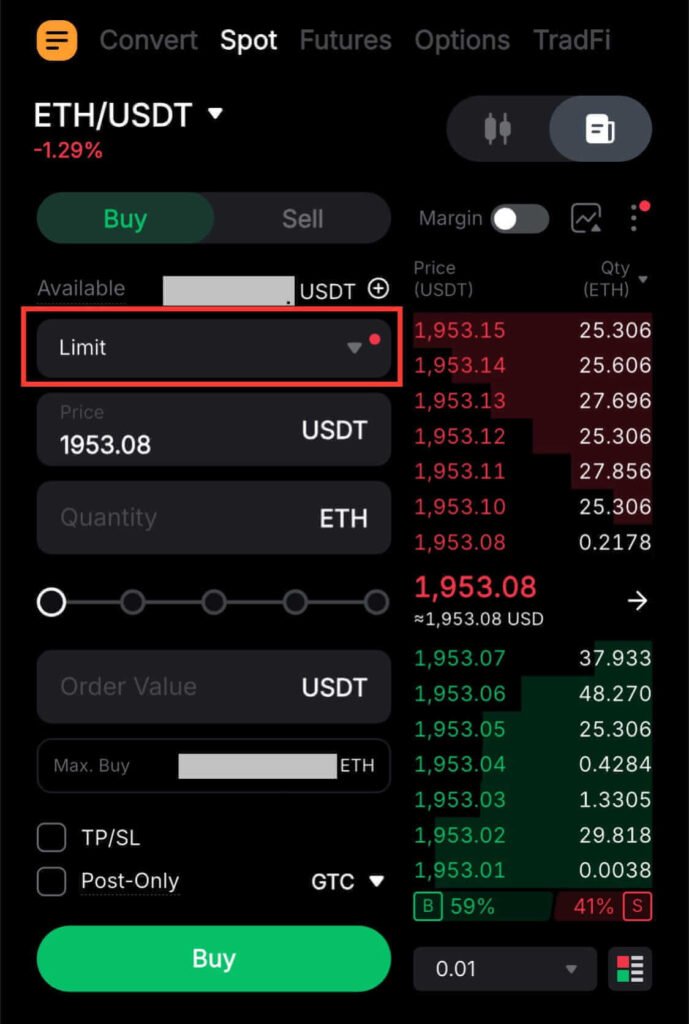
Under the Buy/Sell section, tap the order type, then select Limit. This allows you to set the exact price you want to buy at, rather than purchasing at the current price.
Step 7: Enter Your Limit Price
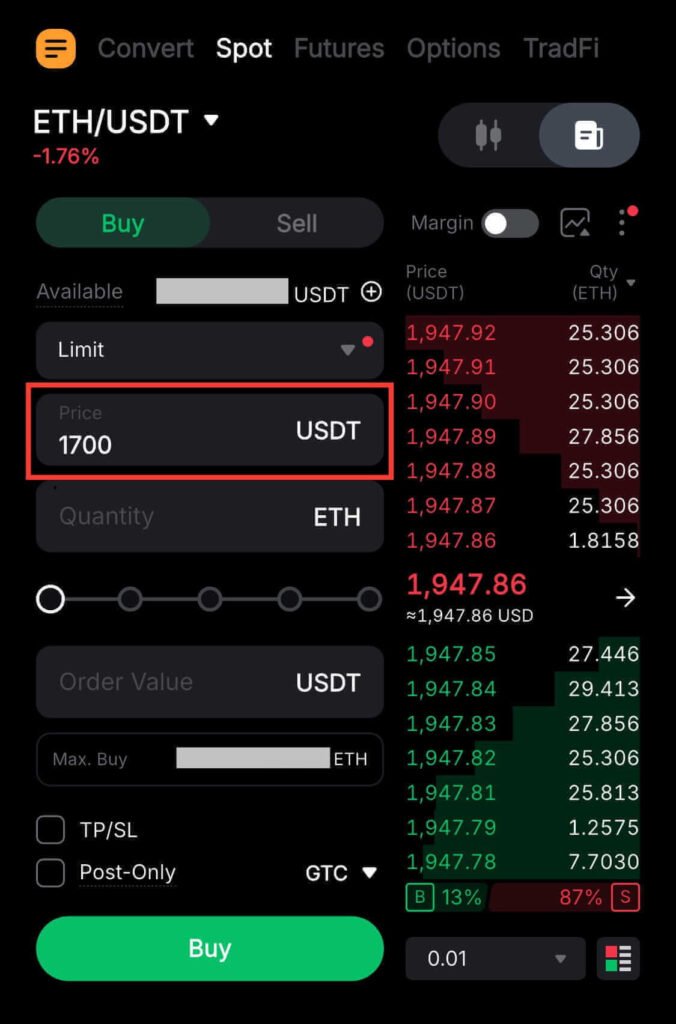
In the Price field, enter the exact price you want to buy at. For example, if ETH is trading at $1,900 but you want to buy at $1,700, enter 1,700.
Step 8: Enter the Quantity
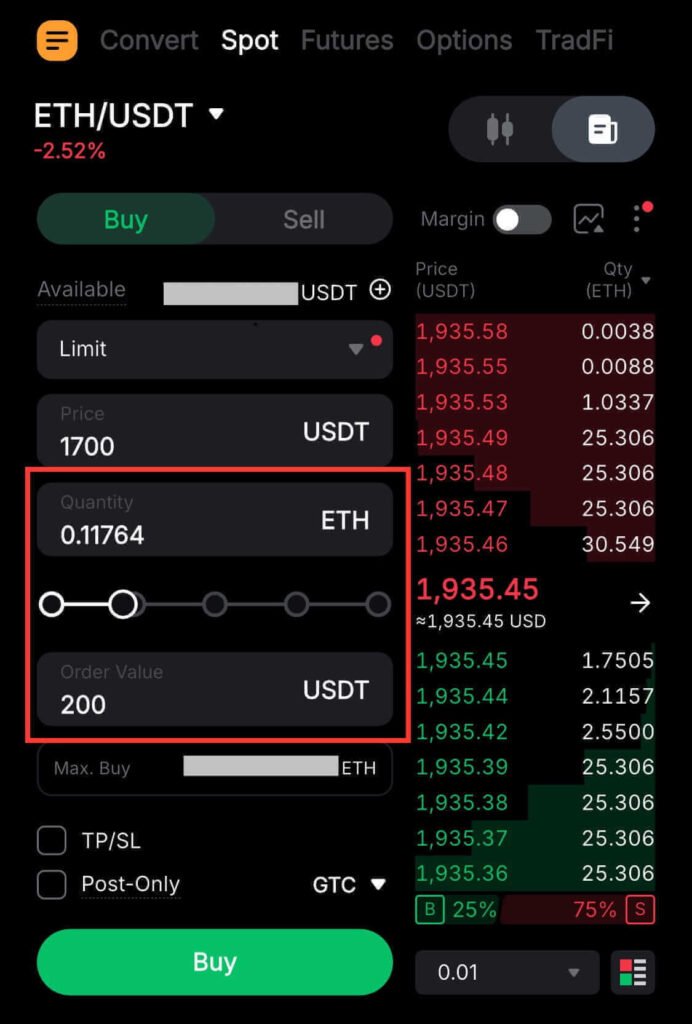
Now you need to choose how much of your money you want to use for this trade. There are three easy ways to do that:
- Enter the amount of crypto in Quantity
- Use the percentage slider to choose part of your balance (like 25%, 50%, or 100%).
- Enter the USDT amount in Order Value
If you’re new to crypto trading, the easiest option is to use the Order Value field. For example, if you want to spend $200, enter 200 in the Order Value (USDT) field. Bybit will calculate how much you can buy and put that number in the Quantity box.
Step 9: Review and Place Your Order
Review the trading pair, price, and quantity. If everything appears correct, tap Buy. Your buy limit order will appear in Orders and execute once the coin hits your target price.
If you’re following along and haven’t created your Bybit account yet, open one here and verify it before placing your first trade.
How to Place a Sell Limit Order on Bybit Spot
Follow the steps below to place a Sell Limit Order on Bybit Spot.
Step 1: Log In to Bybit
Sign in to your Bybit account.
Step 2: Open the Trading Page
From the home screen, tap Trade.
Step 3: Switch to Spot Trading
On the trading page, select Spot.
Step 4: Choose the Coin to Sell
Tap the current trading pair (for example, ETH/USDT), then select the pair for the coin you want to sell.
💡 Note: Steps 1–4 are the same as placing a buy limit order. Refer to the screenshots above if needed.
Step 5: Select “Sell”
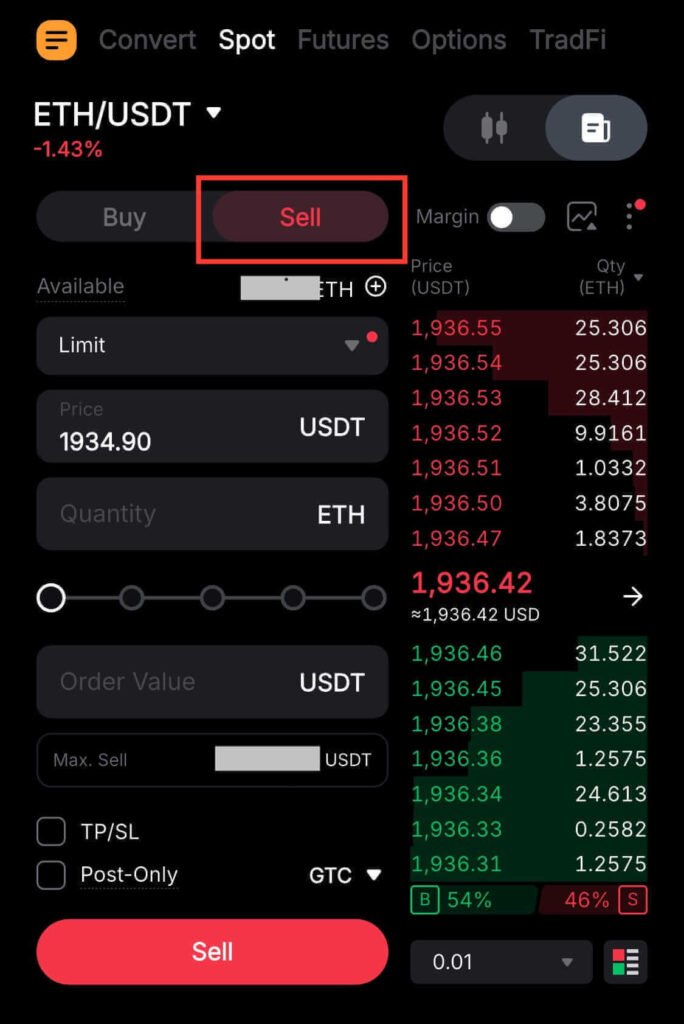
Tap Sell in the order menu to set up a Sell limit order.
Step 6: Set the Order Type to “Limit”
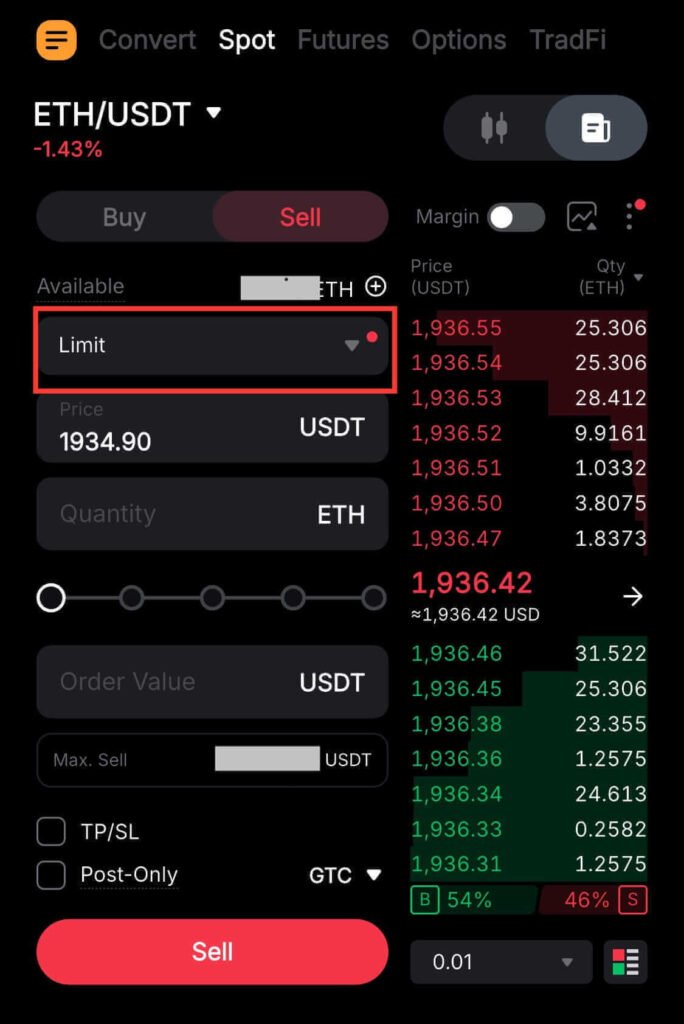
Under Order Type, select Limit. This allows you to choose the exact price at which you want to sell.
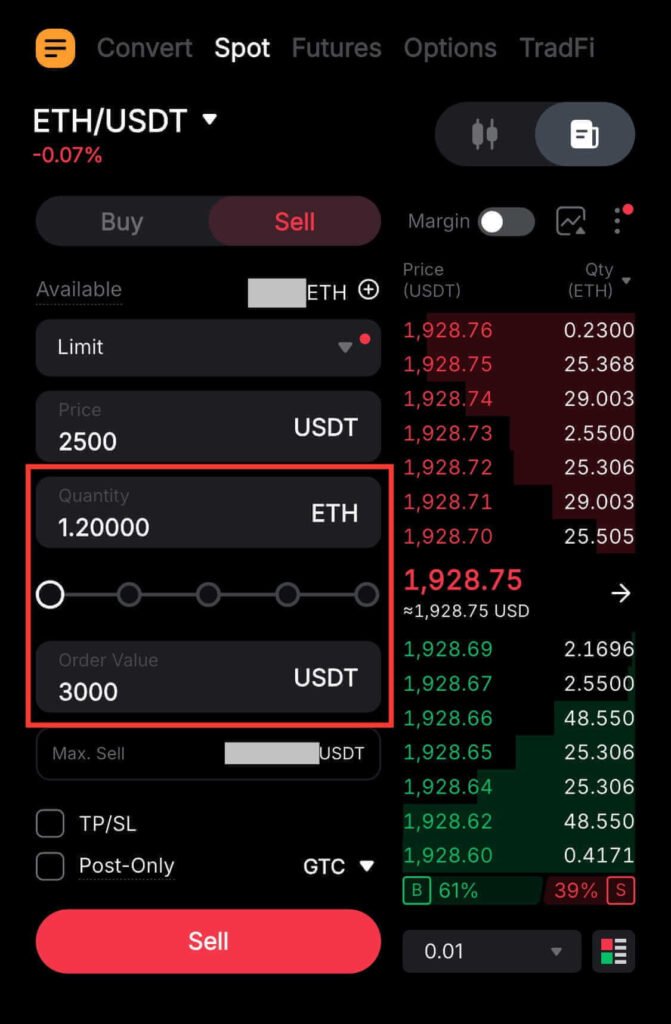
Step 7: Enter Your Selling Price
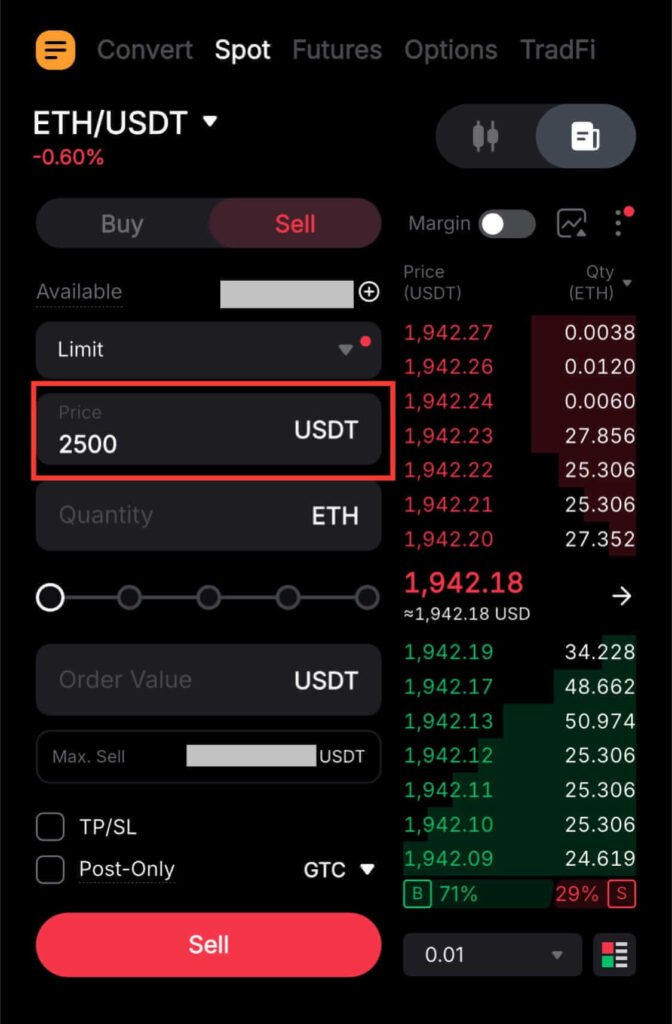
In the Price field, enter the price at which you want to sell your coin. For example, if the coin is trading at $1900 and you want to sell at $2500, enter 2500.
Step 8: Enter the Amount to Sell
Type in how much crypto you want to sell in the Quantity box. You can also use the percentage slider to sell part of your balance, or enter the amount in USDT instead.
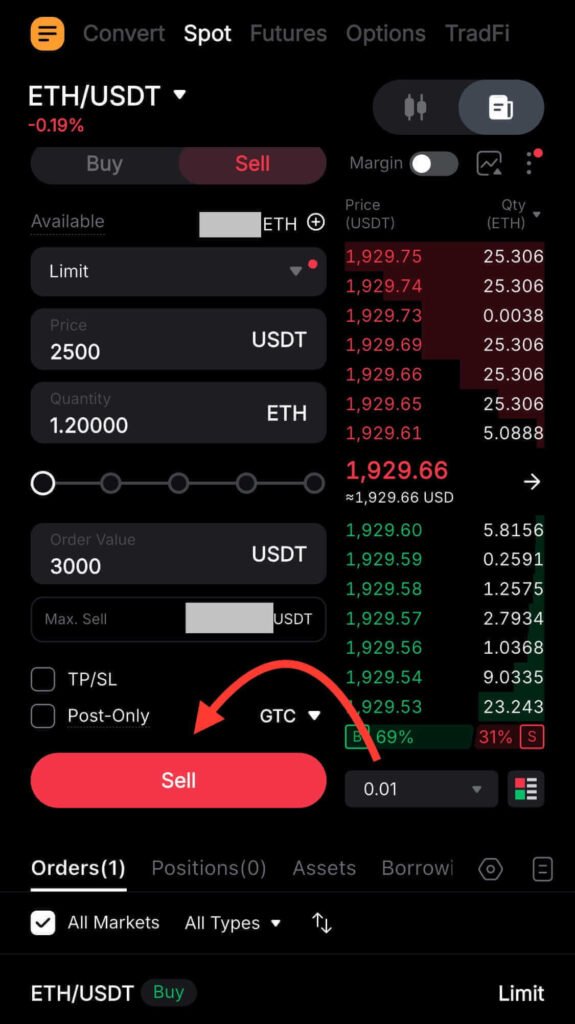
Step 9: Confirm and Place the Order
Double-check the trading pair, price, and quantity. If everything looks correct, tap Sell to place the order. Your sell limit order will show under Orders and execute once the coin hits your chosen price.
When to Use a Limit Order on Bybit
Here’s when it makes sense to use a limit order on Bybit:
- When you want to buy at a specific price: If a coin is trading at $500 but you only want to buy at $300, set a limit order at $300. Your order will only execute if the price drops to that amount.
- When you want to sell at a specific price: If you bought a coin for $50 and want to sell it for $70, place a limit order at $70. It only sells when the market reaches that price.
- When you want to pay lower fees: Limit orders are usually cheaper than market orders on Bybit. That’s because they often qualify as maker trades. If you trade a lot, this can save you money over time.
In conclusion, limit orders are a smart way to get the price you want and save on crypto trading fees.
Mistakes Beginners Make with Limit Orders on Bybit
Before placing a limit order on Bybit, watch out for these common mistakes:
1. Setting a Buy Limit Above the Current Price
A buy limit order should always be below the current market price. Setting it higher may trigger an immediate execution at the best available price. That defeats the purpose of a limit order. Always check the live price and choose a lower price if your goal is to buy cheaper.
2. Setting a Sell Limit Below the Current Price
A sell limit order should be placed above the current market price. If you set it lower, the order might execute immediately. The goal is to sell higher, so double-check the market price and place your sell limit above it.
3. Leaving Limit Orders Open Too Long
Crypto prices move every day. Leaving a limit order unattended can be dangerous. An old order might execute at a price that no longer fits your strategy. Make it a habit to review your open orders and cancel or adjust them when your plan changes.
4. Changing Limit Orders Based on Emotions
Shifting your orders every time the market rises or falls is a bad habit. Set your limit orders according to your strategy, and stick to them unless there’s a clear reason to change.
Knowing how to place limit orders is important. But crypto involves more than just clicking buy or sell. If you’d like clarity before making bigger moves, I offer a free 30-minute intro session where I guide you through exchanges, security, and trading fundamentals. Together, we’ll create a clear action plan tailored to your goals.
Learn more about my coaching and book your free intro session here.
Conclusion
Limit orders give you control and help you trade with discipline. To start safely, place a small order of around $20 today. Once you feel comfortable, you can trade larger amounts.
Wondering if limit orders are really that easy? Open your Bybit account now and begin trading today.
FAQs
Additional Resources:
- Crypto Market Order vs Limit Order: Key Differences & When to Use Each
- How to Deposit USDT on Bybit Without Mistakes
And guess what? We’re also on Instagram and X (Twitter). Join us there for even more fun and useful content!
DISCLAIMER:
The information provided here is for informational purposes only. Do not rely solely on it for making investment decisions. It is not financial, tax, legal, or accounting advice. Always do your own research or consult a financial advisor before investing in cryptocurrency.